
DOM 操作二
一、元素的特性 attribute
Attribute 分类
- HTML 标准制定的 attribute,称之为标准 Attribute
- 自定义的 Attribute,称之为非标准 Attribute
Attribute 操作
hasAttribute: 判断是否有该属性getAttribute: 获取属性setAttribute: 设置属性removeAttribute: 移除属性attributes: 所有属性
注意
- 大小写不敏感
getAttribute获取到的都是字符串
html
<div
	id="abc"
	class="box"
	title="box"
	mydata="lalala"
>
	box
</div>

<script>
	var boxEl = document.querySelector('.box')

	console.log(boxEl.hasAttribute('title'))
	console.log(boxEl.getAttribute('title'))

	boxEl.setAttribute('id', 'cba')
	boxEl.removeAttribute('mydata')

	console.log(boxEl.attributes)
</script>二、元素的属性 property
标准的 attribute 在对应的 dom 对象中都有对应的 property。
非标准的 attribute 没有对应的 property。
html
<div
	id="abc"
	class="box"
	mydata="lalala"
>
	我是box
</div>

<script>
	var boxEl = document.querySelector('.box')

	console.log(boxEl.id, boxEl.mydata) // abc undefined
</script>attribute property 区别
- 元素属性称之为:attribute
- 对象属性称之为:property
- 自定义的 attribute 用
getAttribute,标准制定的 attribute 可用property
三、元素的 class、style
class 使用
动态修改 class 完成某个功能,使用 class
- className: 字符串形式,可能会覆盖原有类
- classList: add、remove、toggle、contains 判断有没有存在某个 class
html
<style>
	.active {
		color: tomato;
		font-weight: 900;
		font-size: 24px;
		padding: 10px;
		background-color: teal;
	}
</style>

<div class="box">我是box</div>

<script>
	var boxEL = document.querySelector('.box')
	boxEL.onclick = function () {
		boxEL.classList.toggle('active')
	}
</script>style 使用
精准修改某个 css 属性的值,使用 style 属性。如果值设置为空字符串,使用 css 默认样式。
- style 的读取: getComputedStyle(element)
html
<div class="box">我是box</div>

<script>
	var boxEL = document.querySelector('.box')

	var counter = 1
	boxEL.onclick = function () {
		boxEL.style.width = 100 * counter++ + 'px'
		// 多样式写法-会覆盖原有style
		boxEL.style.cssText = 'font-size: 30px; color: red'
		console.log(getComputedStyle(boxEL).width)
	}
</script>四、元素的 data-属性
标准制定的 attribute 会有对应的 property,而非标准的 attribute 没有对应的 property,除了可以使用 getAttribute,还可以使用 data-属性
html
<div
	class="box"
	data-age="18"
></div>

<script>
	var boxEl = document.querySelector('.box')
	console.log(boxEl.dataset.age)
</script>五、元素的常见操作
创建元素
createElement
插入元素
append: 在 node 末尾插入节点或字符串prepend:在 node 开头插入节点或字符串after: 在 node 前面插入节点或字符串before: 在 node 后面插入节点或字符串replaceWith: 将 node 替换为给定的节点或字符串
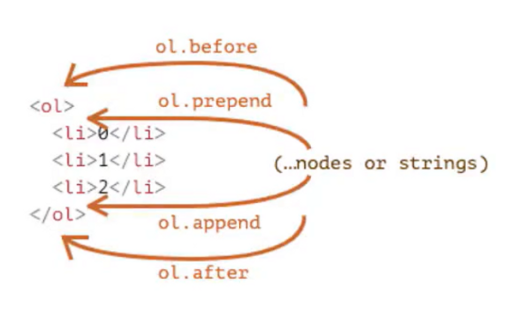
html
<div class="box">
	<span>hehehe</span>
	<p>hahahaha</p>
</div>

<script>
	var boxEl = document.querySelector('.box')

	// 真实创建一个DOM对象
	var h2El = document.createElement('h2')
	h2El.className = 'title'
	h2El.classList.add('active')
	h2El.textContent = '我是标题'

	// 插入node末尾
	boxEl.append(h2El)

	// 插入node开头
	boxEl.prepend(h2El)

	// 插入node前面
	boxEl.after(h2El)

	// 插入node后面
	boxEl.before(h2El)

	// 替换node
	boxEl.replaceWith(h2El)
</script>移除元素
remove
html
<button class="remove-btn">移除box</button>
<div class="box">
	<h2>我是标题</h2>
	<span>hehehe</span>
	<p>hahahahah</p>
</div>

<script>
	var boxEl = document.querySelector('.box')
	var removeBtnEl = document.querySelector('.remove-btn')

	removeBtnEl.onclick = function () {
		boxEl.remove()
	}
</script>克隆元素
cloneNode: 接受一个参数 Boolean 类型,true 表示深度克隆
html
<button class="clone-btn">克隆box</button>
<div class="box">
	<h2>我是标题</h2>
	<span>hehehe</span>
	<p>hahahahah</p>
</div>

<script>
	var boxEl = document.querySelector('.box')
	var cloneBtnEl = document.querySelector('.clone-btn')

	var counter = 0
	cloneBtnEl.onclick = function () {
		var newNode = boxEl.cloneNode(true)
		newNode.children[0].textContent = '我也是标题' + counter++
		boxEl.after(newNode)
	}
</script>六、元素的大小和位置
获取内容高度,宽度
- clientWidth: contentWidth + padding(不包含滚动条)
- clientHeight: contentHeight + padding
- clientTop: border-top 的宽度
- clientLeft: border-left 的宽度
获取完整高度,宽度
- offsetWidth: 元素完整的宽度
- offsetHeight: 元素完整的高度
- offsetLeft: 距离父元素的 x
- offsetTop: 距离父元素的 y
获取可滚动的高度,宽度
- scrollWidth: 整个可滚动的区域宽度
- scrollHeight: 整个可滚动的区域高度
- scrollLeft: 滚动部分的宽度
- scrollTop: 滚动部分的宽度
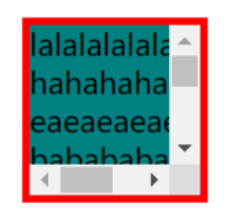
html
<style>
	* {
		margin: 0;
		padding: 0;
	}

	body {
		padding: 100px;
	}

	.box {
		box-sizing: border-box;
		width: 100px;
		height: 100px;
		background-color: teal;
		border: 4px solid red;
		overflow: auto;
		margin: 8px;
	}
</style>

<div class="box">
	lalalalalala hahahahahaha eaeaeaeaeaea babababababa cacacacacaca lalalalalala
	hahahahahaha eaeaeaeaeaea babababababa cacacacacaca
</div>

<script>
	var boxEl = document.querySelector('.box')

	// 1、获取内容高度,宽度
	console.log(
		boxEl.clientHeight,
		boxEl.clientWidth,
		boxEl.clientLeft,
		boxEl.clientTop
	)

	// 2、获取完整高度
	console.log(
		boxEl.offsetWidth,
		boxEl.offsetHeight,
		boxEl.offsetLeft,
		boxEl.offsetTop
	)

	//3、获取可滚动的高度
	console.log(
		boxEl.scrollWidth,
		boxEl.scrollHeight,
		boxEl.scrollLeft,
		boxEl.scrollTop
	)
</script>七、window 的大小和滚动
window 的宽度和高度
- innerWidth, innerHeight: 获取 window 窗口的宽度和高度(包括滚动条)
- outerWidth, outerHeight: 获取 window 窗口的整个宽度和高度(包括调试工具、工具栏)
- documentElement.clientWidth, documentElement.clientHeight: 获取 html 的宽度和高度(不包含滚动条)
window 的滚动位置
- scrollX: X 轴滚动的位置(别名 pageXOffset)
- scrollY:Y 轴滚动的位置(别名 pageYOffset)
滚动方法
- scrollBy(x, y):将页面滚动至相当于当前的 x,y 位置
- scrollTo(pageX, pagexY): 将页面滚动至绝对坐标
javascript
console.log(window.innerWidth, window.innerHeight)
console.log(window.outerWidth, window.outerHeight)
console.log(
	document.documentElement.offsetWidth,
	document.documentElement.offsetHeight
)

window.onclick = function () {
	console.log(window.scrollX, window.scrollY)
}

var scrollBtnEl = document.querySelector('.scroll-btn')
scrollBtnEl.onclick = function () {
	// 1、window.scrollBy(0, 100)
	// 2、window.scrollTo(0, 300)
}