
初识 TypeScript
一、使用 ts-node
安装 ts-node
npm install ts-node -g安装 ts-node 所需依赖 tslib 和@types/node 两个包
npm install tslib @types/node -g直接通过 ts-node 允许 ts 代码
ts-node math.ts二、类型注解
// 定义标识符
let name: string = 'zhishou'
const age: number = 18
const height: number = 1.88

export {}三、类型推导
// 声明一个标识符时,如果有直接进行赋值,会根据赋值的类型推导出标识符的类型注解

// let进行类型推导,推导出来的是通用类型
let name = 'zhishou'
name = 123

// const进行类型推导,推导出来的是字面量类型
const age = 18

export {}四、TS 和 JS 的数据类型
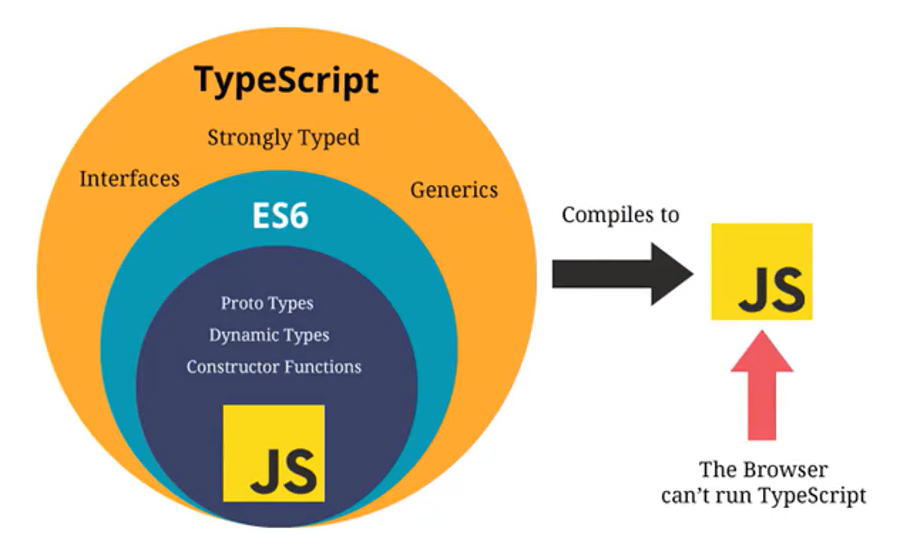
JS 类型-number 类型
ts 和 js 一样,不区分整数类型和浮点数类型,统一为 number 类型
let num = 100
num = 20
num = 6.66ES6 新增了二进制和八进制的表示方法,ts 也支持二进制,八进制,十六进制
num = 100 // 十进制
num = 0b110 // 二进制
num = 0o555 // 八进制
num = 0xf23 // 十六进制JS 类型-boolean 类型
boolean 类型只有两个取值:true 和 false
let flag: boolean = true
flag = fasle
flag = 20 > 30JS 类型-string 类型
string 类型是字符串类型,可以使用双引号或单引号表示,同时也支持模板字符串
let message: string = 'hello world'
message = 'hello message'

const name = 'hand'
message = `my name is ${name}`JS 类型-Array 类型
1、string[]:数组类型,并且数组中存放的是字符串类型
2、Array<string>:数组类型,并且数组中存放的是字符串类型
let names: string[] = ['aaa', 'bbb', 'ccc']
names.push('ddd')

let ages: Array<number> = [1, 2, 3]JS 类型-Object 类型
type InfoType = {
	name: string
	age: number
}

let info: InfoType = {
	name: 'kroos',
	age: 18,
}

/* 这样子写,不能获取也不能设置数据 */
let info: object = {
	name: 'kroos',
	age: 18,
}
console.log(info.name)
console.log(info.age)JS 类型-Symbol 类型
在 ES5 中,是不可以在对象中添加相同的属性名称的,比如:
const person = {
	name: 'zhishou',
	name: 'kroos',
}通常的做法是定义两个不同的属性名字
但也可以提过 symbol 来定义相同的名称,因为 Symbol 函数返回的是不同的值
const s1: symbol = Symbol('title')
const s2: symbol = Symbol('title')

const person = {
	[s1]: 'zhishou',
	[s2]: 'kroos',
}JS 类型-null 类型和 undefined 类型
在 JS 中,undefined 和 null 是两个基本数据类型
在 TS 中,它们各自的类型也是 undefined 和 null,也就意味着他们既是实际的值,也是自己的类型
let n: null = null
let u: undefined = undefinedTS 类型-any 类型
在某些情况下,确实无法确定一个变量的类型,并且可能会发生一些变化,这个时候可以是使用 any 类型
- 可以对 any 类型的变量进行任意操作,包括获取不存在的属性,方法
- 可以给一个 any 类型的变量赋任何的值,比如数字,字符串
// any类型标识不限制标识符的任意类型,并且可以在标识符上进行任意操作
let id: any = 'aaa'

id = 123如果对于某些情况的处理过于繁琐,不希望添加规定的类型注解;
或者在引入一些第三方库时,确实了类型注解,这个时候可以用 any
包括在 vue 源码中,也会使用导 any 来进行某些类型的适配
TS 类型-unknown 类型
用于描述类型不确定的变量
和 any 类型有点类似,但是 unknown 类型的值上做任何事情都是不合法的
要求必须进行类型的校验(类型缩小)
let id: unknown = 'aaa'

id = 123

// console.log(id.length)

if (typeof id === 'string') {
	// 类型缩小
	console.log(id.length)
}

export {}TS 类型-void 类型
如果一个函数没有返回值,那么它的返回值类型是 void
如果返回值的 void 类型,那可以返回 undefined
当基于上下文的类型推导出来返回类型为 void 的时候,并不会强制函数一定不能返回内容
function sum(num1: number, num2: number): void {
	console.log(num1 + num2)
	return undefined
}

sum(10, 20)

// 应用场景:用来指定函数类型的返回值是void
type FooType = () => void
const foo: FooType = () => {}

export {}TS 类型-never 类型
never 表示永远不会发生值的类型,比如一个函数:
- 如果一个函数中是一个死循环或者抛出一个异常,那这个函数不会返回东西,那么写 void 类型或者其他类型作为返回值类型都不合适,就可以泳 never 类型
function foo(): never {
	// while (true) {
	// 	console.log('----')
	// }
	throw new Error('111')
}
foo()应用场景
- 开发中很少实际去定义 never 类型
- 某些情况下会自动进行类型推导出 never
- 开发框架(工具)的时候会用到 never
- 封装一些类型工具的时候会用到 never
function message(message: number | string | boolean): void {
	switch (typeof message) {
		case 'number':
			console.log(message)
			break
		case 'string':
			console.log(message.length)
			break
		case 'boolean':
			console.log(Number(message))
			break
		default:
			const check: never = message
	}
}

message(123)
message('aaa')
message(true)TS 类型-tuple 类型
元组和数组有什么区别:
- 数组通常建议存放相同类型的元素,不同类型的元素是不推荐存放在数组中的(可以放在对象或者元组中)
- 元组中每个元素都有自己特定的类型,根据索引值获取到的值可以确定对呀的类型
const info: [string, number, number] = ['kroos', 18, 1.88]

function useState(initialState: number): [number, (newState: number) => void] {
	let stateValue = initialState
	const setState = (newState: number) => {
		stateValue = newState
	}
	return [stateValue, setState]
}

const [count, setCount] = useState(10)

export {}TS 类型-联合类型
TS 类型系统允许使用多种运算符,从现有类型中构建新类型
let foo: number | string = '123'

foo = 123TS 类型-交叉类型
多种类型要同时满足
type IDType = number | string

const id1: IDType = 'abc'
const id2: IDType = 123
type NewType = number & string // 没有意义// 实际用法
interface IPerson {
name: string
age: number
}
interface ICoder {
name: string
coding: () => void
}
const info: IPerson & ICoder = {
name: 'zhishou',
age: 18,
coding() {
console.log('i am coder')
},
}TS 类型-字面量类型
// 1、字面量类型基本使用
const name: 'hand' = 'hand'
let age: 18 = 18

// 2、将多个字面量类型联合使用 |
type Direction = 'left' | 'right' | 'top' | 'bottom'

const d1: Direction = 'bottom'

// 举例1
type MethodType = 'get' | 'post' | 'delete'
function request(url: string, method: MethodType) {
	console.log(url, method)
}
request('aaa', 'post')

// 举例2 如果method没有断言则会报错
const info = {
	url: 'bbb',
	method: 'get',
}
request(info.url, info.method as 'get')

// 举例3 如果info没有声明类型则会报错
const info2: { url: string; method: MethodType } = {
	url: 'ccc',
	method: 'delete',
}
request(info2.url, info2.method)类型别名
type MyNumber = number
const num: MyNumber = 1

type IDType = number | string
function printID(id: IDType) {
	console.log(id)
}接口声明
interface PointType2 {
	x: number
	y: number
	z?: number
}interface 与 type 的区别:
- type 使用范围广,接口只能声明对象
- 在声明对象是,interface 可以多次声明
- interface 支持继承
- interface 可以被类实现
类型断言
// 获取DOM元素
const imgEl = document.querySelector('.img') as HTMLImageElement

imgEl.src = ''
imgEl.alt = ''

// 类型断言的规则:断言只能断言成更加具体的类型,或者不太具体(any/unknown)的类型
const age: number = 18

// 错误语法
// const age2 = age as string

// TS类型检测是正确的,但代码本身是不正确的
const age3 = age as any
const age4 = age3 as string非空类型断言
非空断言使用的是 !. 表示可以确定某个标识符是有值的,跳过 ts 在编译阶段对它的检测
interface IPerson {
	name: string
	age: number
	friend?: {
		name: string
	}
}

const info: IPerson = {
	name: 'zhishou',
	age: 18,
}

// 访问属性:可选连(?.)
console.log(info.friend?.name)

// 属性赋值:
// 解决方案一:类型缩小
if (info.friend) {
	info.friend.name = 'hand'
}

// 解决方案二:非空类型断言(有点危险,确保friend有值的情况下,才能使用)
info.friend!.name = 'hn'类型缩小
类型缩小:通过类似typeof padding === 'number'的判断语句,来改变 TS 的执行路径
在给定的执行路径中,可以缩小比声明时更小的类型,称为缩小
typeof padding === 'number可以称为类型保护
类型缩小的方式:
- typeof
- 平等缩小(===、!==)
- instanceof
- in
// 1、typeof
function printId(id: string | number) {
	if (typeof id === 'string') {
		console.log(id.length)
	} else {
		console.log(id)
	}
}

// 2、平等缩小
type Direction = 'left' | 'right' | 'up' | 'down'
function switchDirection(direction: Direction) {
	if (direction === 'left') {
		console.log('向左移动')
	} else if (direction === 'right') {
		console.log('向右移动')
	} else if (direction === 'up') {
		console.log('向上移动')
	} else {
		console.log('向下移动')
	}
}

// 3、instanceof
function printDate(date: string | Date) {
	if (date instanceof Date) {
		console.log(date.getTime())
	} else {
		console.log(date)
	}
}
printDate(new Date())

// 4、in -- 判断是否有某一个属性
interface ISwim {
	swim: () => void
}
interface IRun {
	swim: () => void
}
function move(animal: ISwim | IRun) {
	if ('swim' in animal) {
		animal.swim()
	}
}
const fish: ISwim = {
	swim: function () {
		console.log('i can swim')
	},
}
move(fish)五、TS 中的函数类型
参数
function sum(num1: number, num2: number) {
	return num1 + num2
}

const res = sum(123, 321)
console.log(res)

export {}返回值
在定义一个 ts 函数时 返回值的类型可以明确指定,也可以自动进行推导
function sum(num1: number, num2: number): number {
	return num1 + num2
}

const res = sum(123, 321)
console.log(res)

export {}练习
type LyricType = {
	time: number
	text: string
}

function parseLyric(lyric: string): LyricType[] {
	const lyrics: LyricType[] = []
	lyrics.push({ time: 111, text: 'aaa' })
	return lyrics
}

const lyricInfos = parseLyric('zhishouhuangzasd')
for (const item of lyricInfos) {
	console.log(item.time, item.text)
}

export {}匿名函数的参数
当一个函数出现在 TS 可以确定该函数会被如何调用的地方时,函数的参数会自动指定类型
const names: string[] = ['aaa', 'bbb', 'ccc']

// 匿名函数的参数最好不要加类型注解
names.forEach(function (item, index, arr) {
	console.log(item.toUpperCase())
})

export {}这里并没有指定 item 的类型,但是 item 是一个 string 类型
- 这是因为 TS 会根据 forEach 函数的类型以及数据的类型推断出 item 的类型
- 这个过程称之为上下文类型,因为函数执行的上下文可以帮助确定参数和返回值的类型