选择器
1、通用选择器
所有的元素都会被选中;
一般用来给所有元素作一些通用性的设置;
- 比如内边距、外边距
- 比如重置一些内容;
* {
	margin: 0;
	padding: 0;
}2、元素选择器
使用元素的名称
div {
}

span {
}3、Class 选择器
使用.类名
.container {
}

.flex-content {
}4、ID 选择器
使用#id
一个 HTML 文档里面的 id 值是唯一的,不能重复。
- id 值如果由多个单词组成,单词之间可以用中划线-、下划线_连接,也可以使用驼峰标识;
- 最好不要用标签名作为 id 值
#home {
}

#about {
}5、属性选择器
拥有某一个属性[att]
属性等于某个值 [att=val]
<style>
	[title] {
		color: blue;
	}

	[title='box1'] {
		color: red;
	}
</style>

<div title="box1">box1</div>
<div title="box2">box2</div>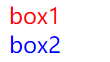
常见的值:
[attr*=val]: 属性值包含某一个值 val;[attr^=val]: 属性值以 val 开头;[attr$=val]: 属性值以 val 结尾;[attr|=val]: 属性值等于 val 或者以 val 开头后面紧跟连接符-;[attr~=val]: 属性值包含 val, 如果有其他值必须以空格和 val 分割;
6、后代选择器
6-1、所有的后代(直接/间接的后代)
选择器之间以空格分割
<style>
	.box span {
		color: red;
	}
</style>

<div class="box">
	<div>
		<span>哈哈哈哈</span>
	</div>
</div>
<div class="box">
	<span>呵呵呵呵</span>
</div>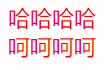
6-2、直接子代选择器(必须是直接子代)
选择器之间以 > 分割;
<style>
	.box > span {
		color: red;
	}
</style>

<div class="box">
	<div>
		<span>哈哈哈哈</span>
	</div>
</div>
<div class="box">
	<span>呵呵呵呵</span>
</div>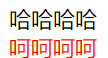
7、兄弟选择器
7-1、相邻兄弟选择器
使用符号 + 连接
<style>
	.box1 + .box2 {
		color: red;
	}
</style>

<div class="box1">box1</div>
<div class="box2">box2</div>
<div class="box3">box3</div>
7-2、普遍兄弟选择器
使用符号~连接
<style>
	.box1 ~ div {
		color: red;
	}
</style>

<div class="box1">box1</div>
<div class="box2">box2</div>
<div class="box3">box3</div>
8、交集选择器
需要同时符合两个选择器条件(两个选择器紧密连接)
<style>
	div.box {
		color: red;
	}
</style>

<div class="box">box1</div>
<p>box2</p>
<span class="box">box3</span>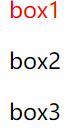
9、并集选择器
符合一个选择器条件即可(两个选择器以,号分割)
<style>
	.box1,
	box2 {
		color: red;
	}
</style>

<div class="box1">box1</div>
<p class="box2">box2</p>
10、伪类选择器
10-1、动态伪类
:link:表示尚未被访问的元素,匹配每个具有 href 属性的未访问的a 或area 元素。
<style>
	a:link {
		color: red;
	}
</style>

<a href="https://www.huangzhishou.com">Gmi</a>:visited:表示会在用户访问链接后生效,仅适用于带有 href 属性的a 或area 元素。
<style>
	a:visited {
		color: red;
	}
</style>

<a href="https://www.huangzhishou.com">Gmi</a>:hover:表示在用户使用指针设备与元素进行交互时匹配,但不一定激活它。通常情况下,用户将光标(鼠标指针)悬停在元素上时触发。
<style>
	a:hover {
		color: red;
	}
</style>

<a href="https://www.huangzhishou.com">Gmi</a>:active:表示匹配被用户激活的元素。它让页面能在浏览器监测到激活时给出反馈。当用鼠标交互时,它代表的是用户按下按键和松开按键之间的时间。
<style>
	a:active {
		color: red;
	}
</style>

<a href="https://www.huangzhishou.com">Gmi</a>:focus:表示获得焦点的元素(如表单输入)。当用户点击或轻触一个元素或使用键盘的 Tab 键选择它时,它会被触发。
<style>
	input:focus {
		outline: none;
	}
</style>

<input type="text" />使用注意 :
- hover 必须放在:link 和:visited 后面才能完全生效
- :active 必须放在:hover 后面才能完全生效
- 所以建议的编写顺序是 :link、:visited、:hover、:active (LVHA)
除了 a 元素,:hover、:active 也能用在其他元素上
10-2、目标伪类
:target:表示一个唯一的元素(目标元素),其 id 与当前 URL 片段匹配。
<style>
	div:target {
		background: teal;
	}
</style>

<a href="#part1">part1</a>
<a href="#part2">part2</a>
<a href="#part3">part3</a>

<div id="part1">part-content-1</div>
<div id="part2">part-content-2</div>
<div id="part3">part-content-3</div>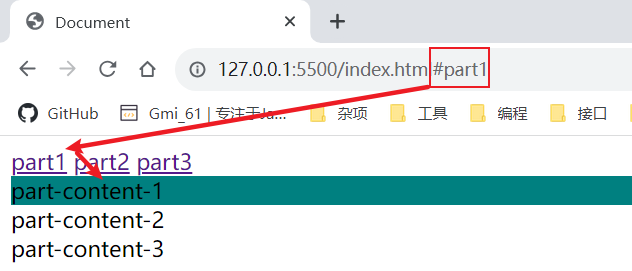
10-3、语言伪类
:lang():表示基于元素语言来匹配页面元素。
<style>
	div:lang(en-US) {
		color: red;
	}

	div:lang(zh-CN) {
		color: pink;
	}
</style>

<div lang="en-US">my name is gmi.</div>
<div lang="zh-CN">我的名字是橘米</div>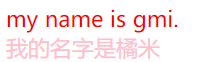
10-4、元素状态伪类
:enabled:表示任何已启用的元素。如果元素可以被激活(例如被选择、单击、输入文本等),或者能够获得焦点,那么它就是启用的。
<style>
	input:enabled {
		background-color: gold;
	}
</style>

<input
	type="text"
	value="this is a input"
/>
:disabled:表示任何被禁用的元素。如果一个元素不能被激活(如选择、点击或接受文本输入)或获取焦点,则该元素处于被禁用状态。
<style>
	input:disabled {
		background-color: gold;
	}
</style>

<input
	type="text"
	value="this is a input"
	disabled
/>
:checked:表示任何处于选中状态的radio, checkbox 或 select 中的option 元素。
<style>
	input:checked + label {
		color: red;
	}
</style>

<input
	type="checkbox"
	value="A"
	id="checkbox-a"
/>
<label for="checkbox-q">A</label>
<input
	type="checkbox"
	value="B"
	id="checkbox-b"
/>
<label for="checkbox-b">B</label>10-5、结构伪类
10-5-1、:nth-child( )
从第一个子元素开始往后计数
/* 父元素中的第1个子元素 */
:nth-child(1) {
}

/*
  n代表任意正整数和0
  父元素中的第偶数个子元素(第2、4、6、8......个)
  跟:nth-child(even)同义
*/
:nth-child(2n) {
}

/*
  n代表任意正整数和0
  父元素中的第奇数个子元素(第1、3、5、7......个)
  跟:nth-child(odd)同义
*/
:nth-child(2n + 1) {
}

/* 代表前2个子元素 */
:nth-child(-n + 2) {
}10-5-2、:nth-last-child()
/* 倒数第一个子元素 */
:nth-last-child(1) {
}

/* 最后2个子元素 */
:nth-last-child(-n + 2) {
}10-5-3、:nth-of-type( )
只计算同种类型的元素
10-5-4、:nth-last-of-type( )
最后一个这种类型的子元素开始往前计数
10-5-5、:first-child
等同于:nth-child(1)
10-5-6、:last-child
等同于:nth-last-child(1)
10-5-7、:first-of-type
等同于:nth-of-type(1)
10-5-8、:last-of-type
等同于:nth-last-of-type(1)
10-5-9、:root
根元素,就是 HTML 元素
10-5-10、:only-child
是父元素中唯一的子元素
10-5-11、:only-of-type
父元素中唯一的这种类型的子元素
10-5-12、:empty
代表里面完全空白的元素
10-6、否定伪类
:not()的格式是:not(x);
- x 是一个简单选择器
- 元素选择器、通用选择器、属性选择器、类选择器、id 选择器、伪类(除否定伪类)
:not(x)表示除x以外的元素
11、伪元素
为了区分伪元素和伪类,建议伪元素使用 2 个冒号,比如::first-line
常用的伪元素:
::first-line:针对首行文本设置属性
<style>
	.box {
		width: 100px;
		border: 1px solid red;
		word-break: break-all;
	}

	.box::first-line {
		color: red;
	}
</style>

<div class="box">lalalalalalalaheheheheheheheheababababababacdcdcdcdcdcd</div>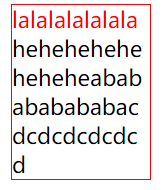
::first-letter:针对首字母设置属性
<style>
    .box {
      width: 100px;
      border: 1px solid red;
      word-break: break-all;
    }


    .box::first-letter {
      font-size: 30px;
      color: gold;
    }
</style>

<div class="box">
    lalalalalalalaheheheheheheheheababababababacdcdcdcdcdcd
</div>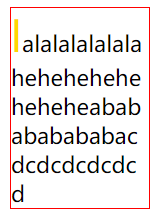
::before:在一个元素的内容之前插入其他内容
<style>
	.box::before {
		content: 'before';
		display: inline-block;
		color: gold;
	}
</style>

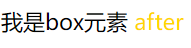
<div class="box">我是box元素</div>
::after:在一个元素的内容之后插入其他内容
<style>
	.box::after {
		content: 'after';
		display: inline-block;
		color: gold;
	}
</style>

<div class="box">我是box元素</div>